

Accordia: case study and handover
Accordia was a structured 1-on-1 tool for engineering managers that I designed, built and ran on my own as a Rally Digital product. As of October 2026 it is paused: payments and sign-ups are switched off, and getaccordia.com stays online as a static site with its free tools until the domain lapses in April 2027.
The product worked. Managers could build a reusable agenda, run every 1-on-1 from it, and have open action items carry into the next session automatically. What didn't work was everything around the product: I never found a repeatable way to get it in front of engineering managers, the scope grew faster than the user base, and the free-tier infrastructure I'd built on stopped being a sensible place to keep a product with no revenue.
This page covers the problem I was trying to fix, what I built and how, why it stalled, and what I'd change if I picked it up again.
- Role
- Design, build and operations, all solo
- Stack
- Next.js 16, React 19, Supabase, Tailwind CSS v4, Vercel, Paddle
- Timeline
- First public content April 2026, paused October 2026
- Status
- Paused. Free tools stay online until April 2027
The problem
I built Accordia because my own 1-on-1s as a developer were a bad process, and I could see exactly where they broke down.
The meetings ran off a shared Word or Google Doc. Every week we spent the first few minutes scrolling to find last week's notes, fixing the layout, or working out which bullet point was an agreed action and which was just a comment. Action items were written down and then never looked at again until someone remembered them, usually too late. The conversation drifted into sprint status and Jira tickets because there was no structure pulling it back to the things a 1-on-1 is actually for: how I was doing, where I was stuck, and where my career was going.
None of that is a people problem. My managers wanted the meetings to be useful. The tools just didn't help them: a blank document gives you no agenda, no memory of what was promised, and no way to tell whether things are getting better or worse over time.
So the goal was narrow and specific. Give a manager a reusable agenda, run every session from it, and make sure an action item agreed in one meeting is still sitting there at the start of the next.
What I built
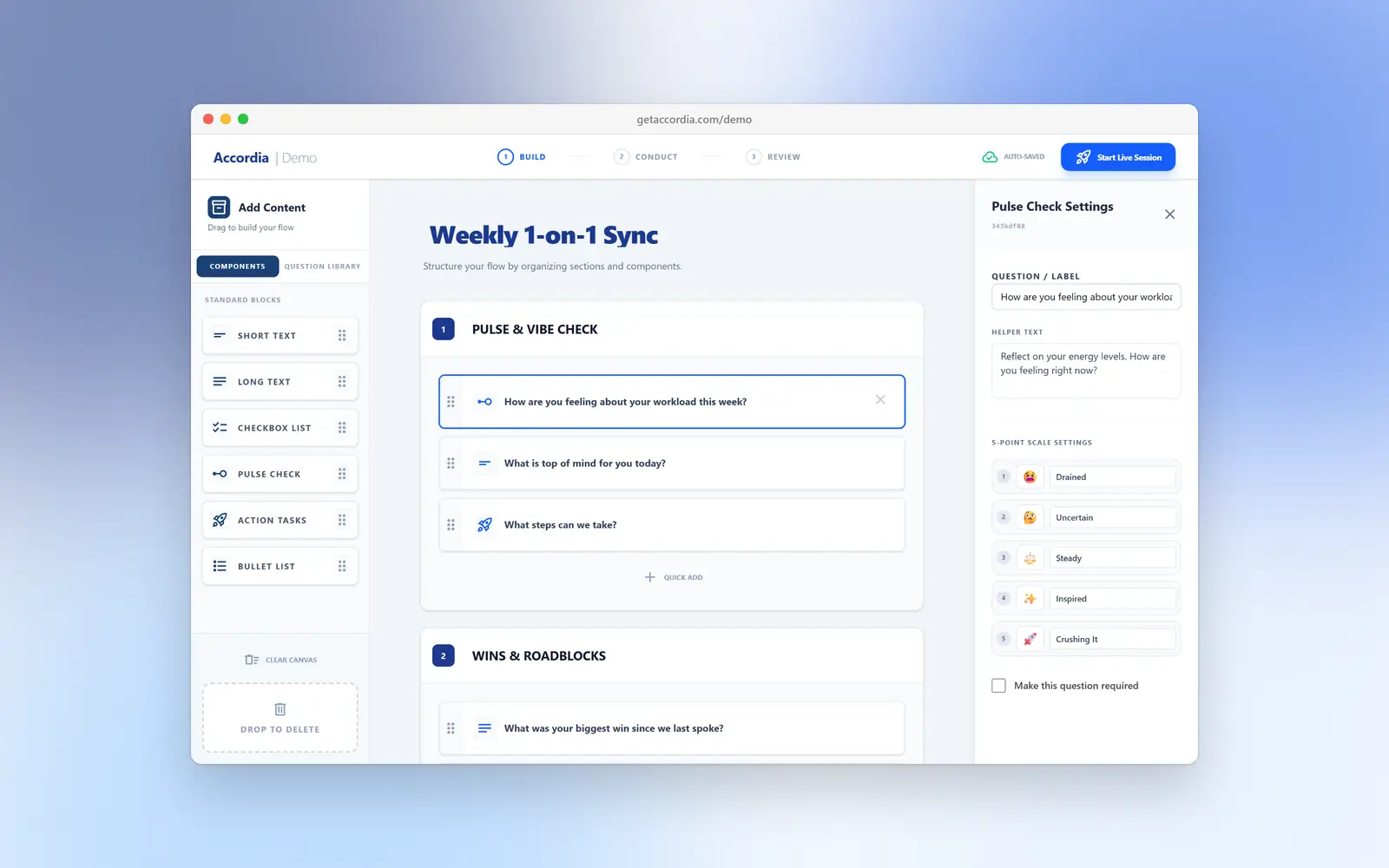
The core product was a loop of three things: build an agenda, run the 1-on-1 from it, and carry what was agreed into the next one.
The product
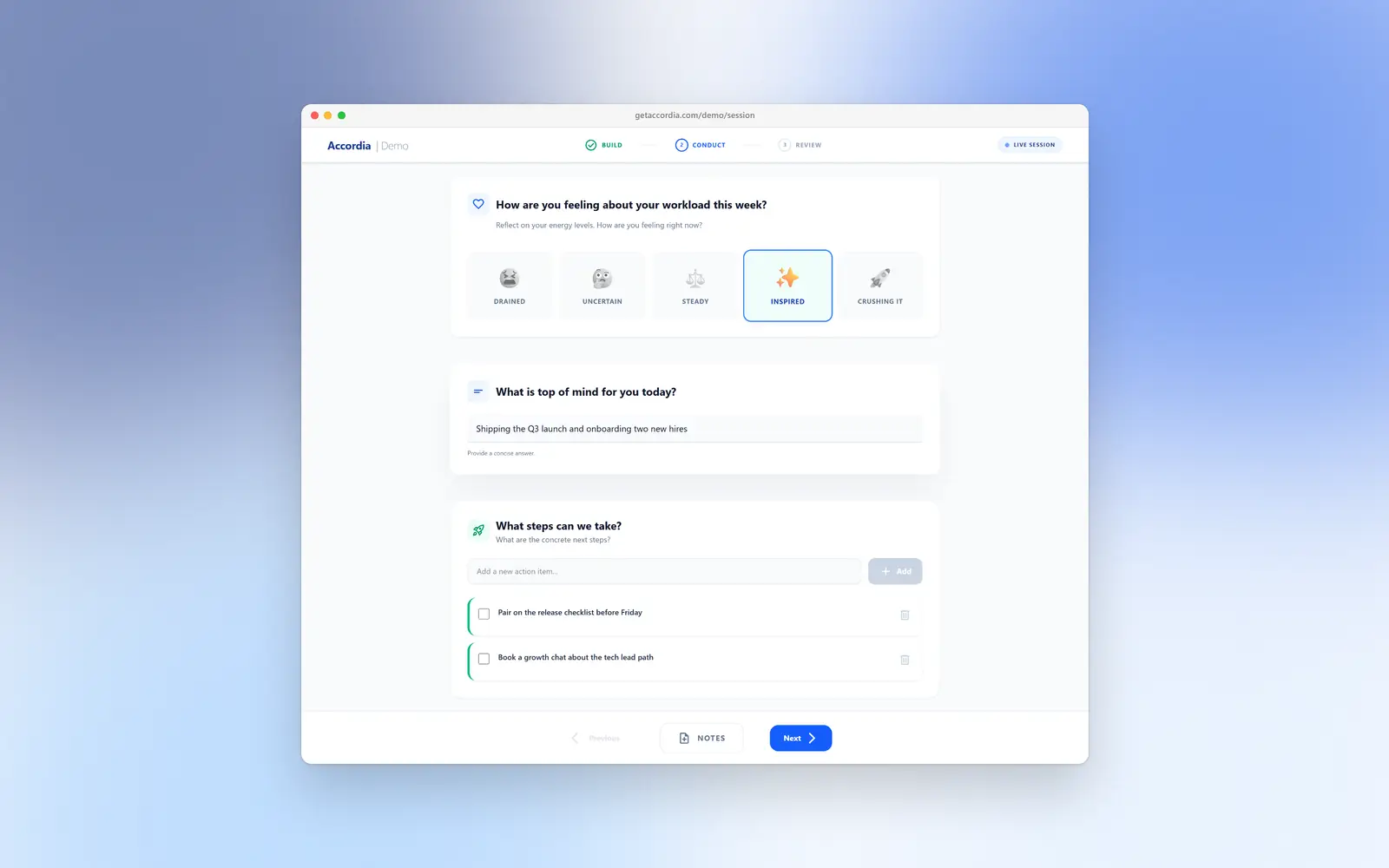
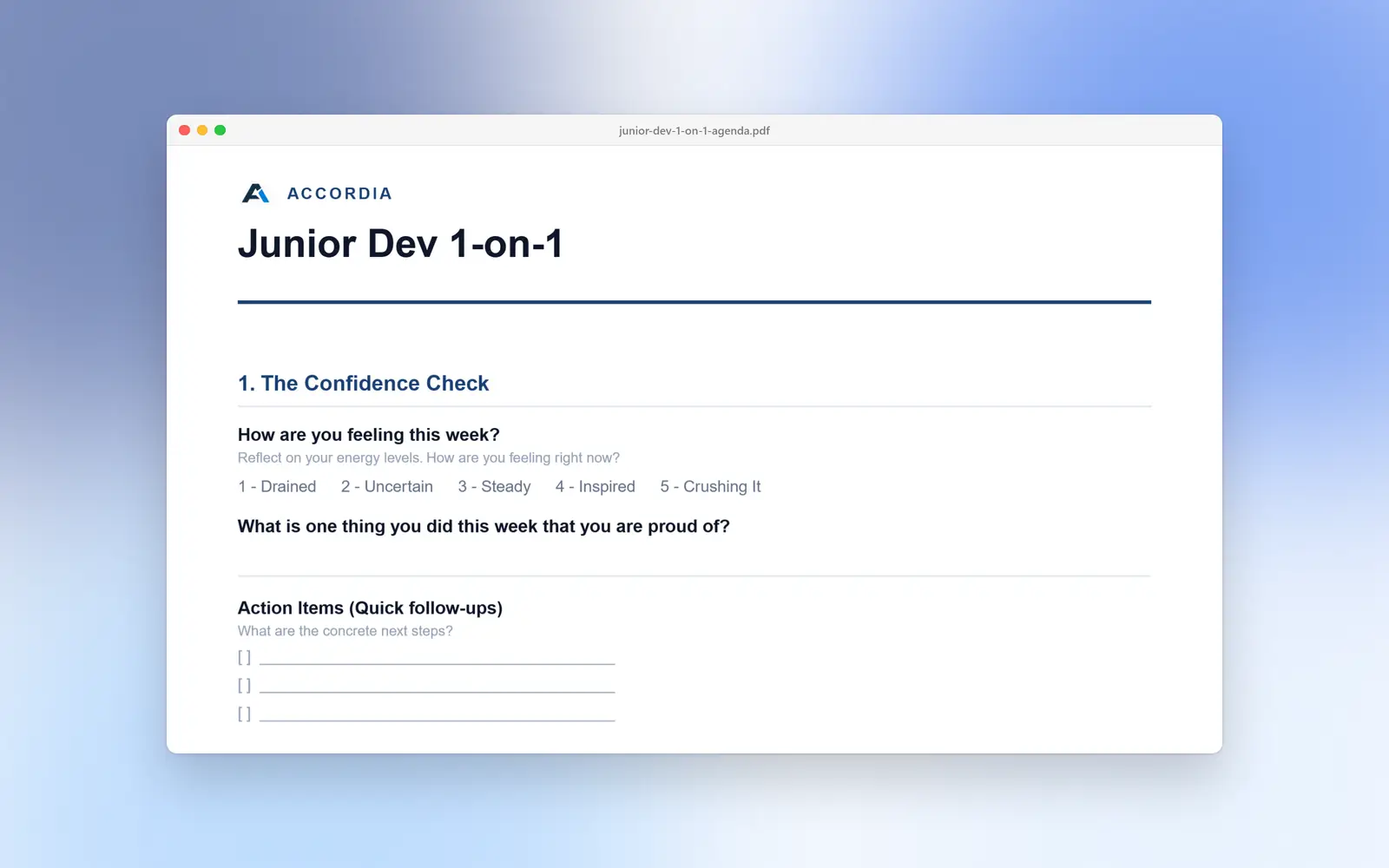
- Agenda builder. A drag-and-drop editor for reusable 1-on-1 templates, with six question types: short answer, long answer, multiple choice, a 1 to 5 pulse check, bullet lists, and action items. On the team plan, a company could publish a standard template every manager had to use.
- Live sessions. Manager and report work through the agenda together, section by section, and both can answer, take notes and add action items during the meeting.
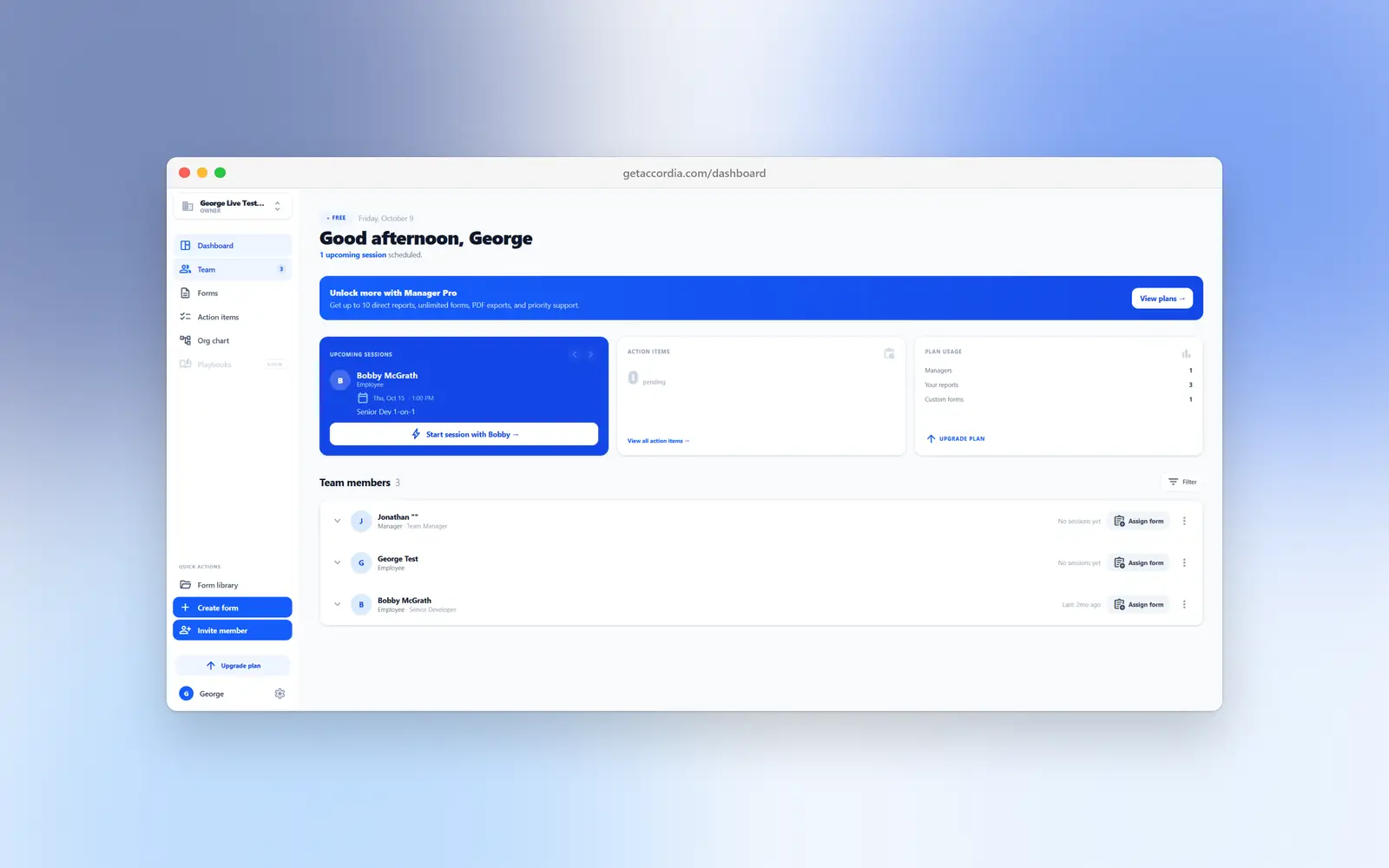
- Action items that carry over. Anything left open shows up at the start of the next session and in a tracker across the whole team, so nothing depends on someone remembering.
- Session history. Every finished 1-on-1 is stored exactly as it happened, including the version of the agenda it used, so editing a template later never rewrites the past.
- Teams and hierarchy. Owners, managers and employees, invites, a reporting line for every person, an org chart, and skip-level visibility so a manager's manager can see how their team's 1-on-1s are going.
- Scheduling. Add-to-calendar links for Google and Outlook, and a prompt to book the next session when one ends.
- Billing and data rights. A free tier (up to 3 reports), Manager Pro at $29 a month, and Team Pro at $75 a month for three managers, with per-seat add-ons, plus self-serve data export and account deletion.
The acquisition side
Because the product needed a manager and their whole team to sign up before it was useful, I built a set of free things that worked on their own with no account:
- A 1-on-1 agenda builder that exports a PDF.
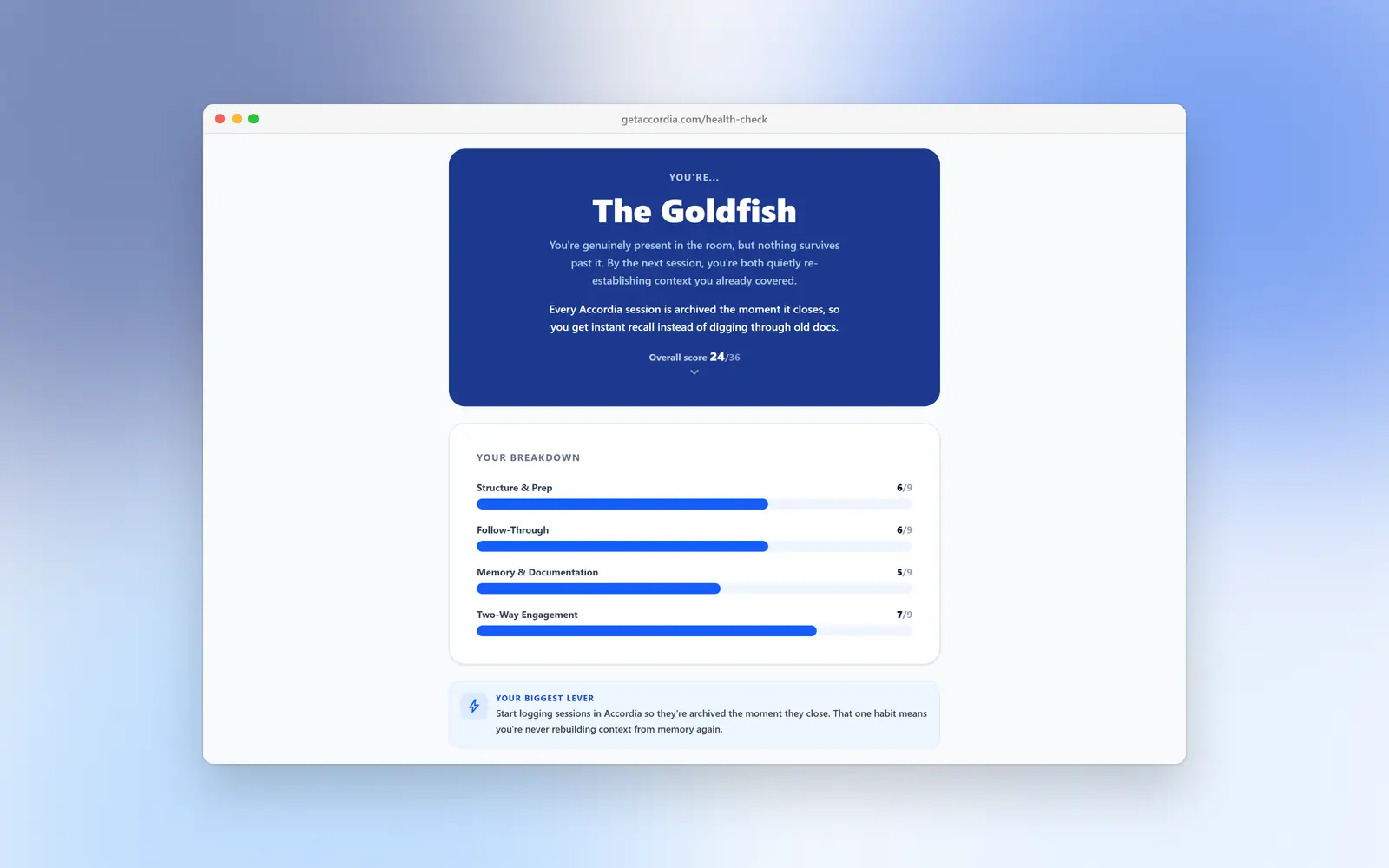
- A 2-minute 1-on-1 Health Check quiz that gives you a manager “archetype” and a shareable result card.
- A question library, with pages tailored to each archetype.
- 37 long-form articles: 13 guides, 10 agenda templates and 14 tool comparisons.
- A full interactive demo of the product that runs in the browser, with no sign-up and nothing saved.
How it was built
Accordia is a Next.js 16 and React 19 app on Supabase (Postgres, Auth and row-level security), styled with Tailwind CSS v4, hosted on Vercel, with Paddle handling payments as merchant of record. I designed and built all of it on my own, roughly 230 TypeScript and MDX files, with the first public content going live in April 2026.
A few decisions shaped most of the codebase:
What it means: Pages read straight from the database in Server Components; every write is a Server Action.
Why: One less layer to build and keep in sync for a solo developer.
What it means: Row-level security decides who can see which rows, by organisation and role.
Why: A bug in app code can't leak another company's 1-on-1 notes, because the database won't return them.
What it means: When a 1-on-1 ends, the full agenda is copied into the session record.
Why: Managers can keep editing templates without changing what past sessions say.
What it means: The same components run against local browser state in the demo and against Supabase in the dashboard.
Why: The demo is the real product, not a mock-up, and it can't touch real data because it never imports the database client.
What it means: After checkout, both the browser and Paddle's webhook can upgrade the account; a unique database index stops them doing it twice.
Why: A paying customer gets their upgrade even if they close the tab or the webhook is slow.
What it means: Plan limits (reports per manager, templates, managers) are checked inside the Server Action before anything is written.
Why: The UI shows the limits, but the server is the thing that enforces them.
I also kept an internal wiki alongside the code covering the architecture, data model, billing and known tech debt, written as if a new developer were joining. That is a large part of why this handover is possible.
Why it didn't work
Accordia didn't fail because the product was broken. It stalled because I was much better at building it than at getting it in front of people, and I kept building when I should have been selling.
Distribution was the real gap. This was my first SaaS, and my plan for finding customers was mostly content: guides, templates, comparisons and free tools aimed at search. That kind of traffic takes many months to build, and I never paired it with anything faster, like talking to engineering managers directly, posting where they already spend time, or finding a few teams to run it with me. Without early users I had no feedback loop and no signal about what to fix.
The scope grew ahead of the users. The first idea was small: one manager, one report, one agenda, action items that don't get lost. By the end it had organisations, three roles, invites, reporting lines, skip-levels, an org chart, company-wide templates, calendar links, four pricing tiers with seat add-ons, and a webhook-driven billing system. Each piece made sense on its own. Together they were built for a company with many managers, before a single manager had made the product part of their week.
It got harder to explain. A product with that many parts is harder to describe in one sentence, harder to demo in thirty seconds, and harder for one person to keep polished. The clearest version of Accordia, “your 1-on-1 agenda, and action items that actually carry over,” got buried under the features around it.
The costs stopped making sense. The app ran on Supabase's free tier, which pauses inactive projects and caps what you can do before you need a paid plan. With no revenue and no sign that was about to change, paying to keep it running, and spending my time on it, was the wrong trade. Stopping is the right call, even with the time already spent, because that time is gone either way. The only question is where the next months go.
Why I still believe in the idea
I still think this is a good idea. Most 1-on-1s still run off a shared doc, action items still go missing, and the big tools in the space (Lattice, 15Five, Culture Amp) are full performance platforms bought by HR, not something one manager picks up on a Tuesday. There is room for a small, sharp tool that just makes the meeting itself better.
If I picked it back up, I would change the product and the route to market together:
- Cut it back to one manager. No organisations, roles or billing tiers at the start. One manager, their reports, a reusable agenda, and action items that carry over. Add team features only when managers who use it weekly ask for them.
- Go where 1-on-1s already happen. Most managers live in Google Calendar, Slack or Notion. A calendar add-on or Slack app that opens the agenda before the meeting and posts open action items afterwards would fit into the week instead of asking for a new tab.
- Talk to managers first, build second. Find ten engineering managers, run their 1-on-1s with them for a month, and only build what they keep using.
- Lead with the free tools. The agenda builder and Health Check were the most self-contained, shareable parts of Accordia. They are the natural front door, with the full product as the next step for people who already use them.
- Pick one channel and commit to it. Content alone was too slow. One direct channel, such as engineering-manager communities, LinkedIn or newsletters, worked properly for a few months, would teach more than a dozen half-done ones.
Where it stands now
The app and payments are switched off, the public site is still up, and the full codebase is intact so Accordia can be restarted without rebuilding anything.
Contact: george@getaccordia.com. Anyone who had an account can email to get a copy of their data or have it deleted.
What I'm taking forward
I'm moving on to a testimonials product, and the main lesson from Accordia is to treat distribution as part of the product from day one, not something to start once it's finished.
- Find users before building features. Talk to the people I'm building for every week, and let what they use decide what comes next.
- Keep the first version small enough to explain in one sentence. Every feature has to earn its place against how much harder it makes the product to explain.
- Choose a channel early and measure it. Know where the first hundred users will come from before writing the billing system.
- Set a checkpoint and keep to it. Decide up front what progress should look like by a given date, and be honest when it isn't there.
- Keep what worked. A solid stack, the database enforcing permissions, a real demo instead of a mock-up, free tools as a front door, and writing things down as I go. All of that carries straight over.
Accordia taught me how to build and ship a complete SaaS product on my own. The next one is about learning to sell one.
